

AI Security Hardening Checklist: 21 Steps, in Order for Your Setup
By Jon Rose, Founder & Managing Partner · · 14 min read
How do you harden a company's environment for AI?
Start with what AI agents inherit: identity, credentials and data access. Inventory the AI tools and tokens you already have, remove long-lived credentials, require compliant devices, fix oversharing, buy enterprise AI tenants, and use the MDM and EDR you already run to lock down AI apps on laptops. Then route model traffic through one gateway, allowlist agent tools, require human approval for risky actions, sandbox agent code, treat everything an agent reads as untrusted, and log every prompt and tool call.
Build your plan Four questions, about 3 minutes. Get the steps below that apply to you, in order, with the settings to use for your stack. Start Hide
Work top to bottom. Tick a step when it's done and it moves to the end. Each step links to its full explanation below.
Copied. Paste it into a doc or a ticket.
AI doesn’t create most of your security problems. It finds the ones you already have, faster.
An AI assistant answers with whatever the user can reach, so every overshared folder becomes searchable. A coding agent runs with whatever tokens sit on the laptop, so every long-lived credential becomes a liability. And unlike a person, an agent will follow instructions hidden in an email, a GitHub issue or a web page it was asked to read.
That changes the hardening priorities. The 21 steps below are grouped by layer. Most are fundamentals that were easy to defer before agents showed up. A few are new. Where it helps, a step links to the matching diagram in our AI security reference architectures.
Identity and access
1. Inventory the AI you already have
You can’t harden what you can’t see. Pull the list from five places:
- SSO logs: which AI apps people sign in to.
- OAuth grants in Google Workspace or Microsoft 365: which AI tools can read mail, files and calendars.
- Expense reports: who is paying for AI subscriptions.
- Code repositories: which API keys and agent configs exist.
- Laptops: your EDR vendor’s AI module (SentinelOne AI Usage Control, CrowdStrike Falcon Guardian) and MDM scripts find AI apps, browser extensions, MCP servers and local agents.
No one really knows how much AI is in the company. We always find forgotten AI proofs of concept, pilots and products that got set up and never properly taken down. They live unmanaged and unmaintained, still holding access into your environment, and every one of them expands the attack surface. Shut down anything without an owner, starting with self-hosted workflow engines like n8n or Langflow that face the internet. Both have had critical unauthenticated flaws. Keep the list current, and put agents, MCP servers and agent credentials on it, not just apps.
2. Put SSO and phishing-resistant MFA in front of every AI tool
Every AI tool that touches company data should sit behind your identity provider, with passkeys or hardware keys rather than SMS. An agent session inherits the strength of the login that created it. If an attacker can phish the human, they get the agent too. That includes the editors of self-hosted workflow engines like n8n: keep them behind SSO or private access, never open to the internet, and patch them within days.
3. Require a compliant device for source code and sensitive SaaS
People run coding agents and personal assistants on laptops you don’t manage. You can’t control those devices, but you can refuse them a session. Okta Device Assurance, Entra Conditional Access and Google’s context-aware access can require a managed, compliant device before granting access to GitHub, cloud consoles and sensitive SaaS. Check your tier first: Okta’s needs Adaptive MFA, Entra’s needs Intune, and Google’s isn’t in any Business edition. And a device check only gates new sign-ins. A token issued earlier keeps working from any device, which is why step 4 matters. See B1, Employee AI Agents.
4. Kill long-lived credentials
This is the single highest-impact step. We regularly find credentials nobody cleaned up: old .env files, access keys sitting in config files, tokens for projects that ended a year ago. There’s nothing sophisticated about it. It’s bad hygiene, and agents read all of it. Replace long-lived credentials with short-lived ones:
- Block classic GitHub personal access tokens. Allow only fine-grained tokens, and set a lifetime policy, because they default to a 366-day maximum.
- Use OIDC and workload identity for CI and cloud workloads instead of stored keys.
- Give model API keys an expiry and one project each, or replace them with workload identity federation.
- Move local dev secrets out of
.envfiles into a password manager CLI such as 1Password.op runinjects secrets when a command starts, so infostealers and agents scanning files find nothing in plaintext. It doesn’t limit what an agent can do with a secret once it has one, so keep a separate vault of low-privilege dev credentials for agent work and keep production out of it. - Never put production credentials on a developer laptop or in an agent sandbox.
- When someone leaves, revoke their OAuth grants, tokens and sessions in every SaaS app. Disabling the account doesn’t revoke tokens it already issued.
5. Give agents their own identities
An agent acting with a human’s full credentials, or with a shared service account, is impossible to scope or audit. Give each agent its own identity with a named human owner. Have it act on behalf of the user with short-lived, narrowly scoped tokens. Okta Agent SSO (built on the Cross App Access standard), Microsoft Entra Agent ID, Aembit and Descope all support this pattern now. The same goes for vendors whose AI agents connect to your EDR, identity provider or cloud, such as AI SOC and SRE tools: give each one its own read-only role or API client, never an admin’s token, and add write actions one at a time. See B2, Vendor-Run Agents.
6. Lock down OAuth app consent
Most AI tools connect to your data through OAuth. If any employee can grant a third-party app read access to their whole mailbox, you have no control over where that data goes. Require admin approval for new third-party apps, block unverified ones, and review existing grants every quarter. In Google Workspace, limit Gmail and Drive’s high-risk scopes to trusted apps. In Microsoft 365, keep Microsoft-managed consent on so users can’t grant mail and file scopes, and turn on the admin consent workflow. Changing these settings doesn’t revoke grants people already made, so review and remove those separately. This matters more than it looks for AI email assistants, which often ask to read and send mail, for AI meeting notetakers, which join through a calendar grant, and for developers: most coding agents sign in to GitHub and SaaS with OAuth app tokens, not personal access tokens. Agents built in Copilot Studio or Power Automate can run their connectors on the maker’s own credentials, so turn that option off.
Data
7. Fix oversharing before you turn on AI search
Microsoft Copilot, Gemini and enterprise search tools answer with everything the user can technically open. The pattern we see most is a Google Drive or Microsoft 365 file with sharing left open to anyone with the link. Before AI, that file sat quietly overshared. With an agent in the loop, it gets quoted in answers, summarized into a Slack thread or linked from places nobody expected, and quiet oversharing becomes broad disclosure. Before rollout, find and fix open sharing on your most sensitive sites and drives. Varonis, Microsoft Purview and Cyera can find it at scale.
8. Label sensitive data so tools can act on it
Guardrails, DLP and routing all need to know what’s sensitive. Classify data into four tiers (Public, Internal, Confidential and Regulated) and label it where it lives. Confidential holds customer data, PII and source code. Regulated holds PHI, payment data and anything with a contract restriction. Without labels, every downstream AI control is guessing.
9. Write down what data can go into which AI
A one-page policy beats a perfect one nobody reads. Map each data tier to the AI tools approved for it. For example: Public and Internal data in any approved enterprise tool, Confidential data only in tools with no-training terms, and Regulated data only in tools covered by a BAA or equivalent agreement. This is the policy your technical controls enforce later.
10. Buy enterprise tenants and block personal accounts
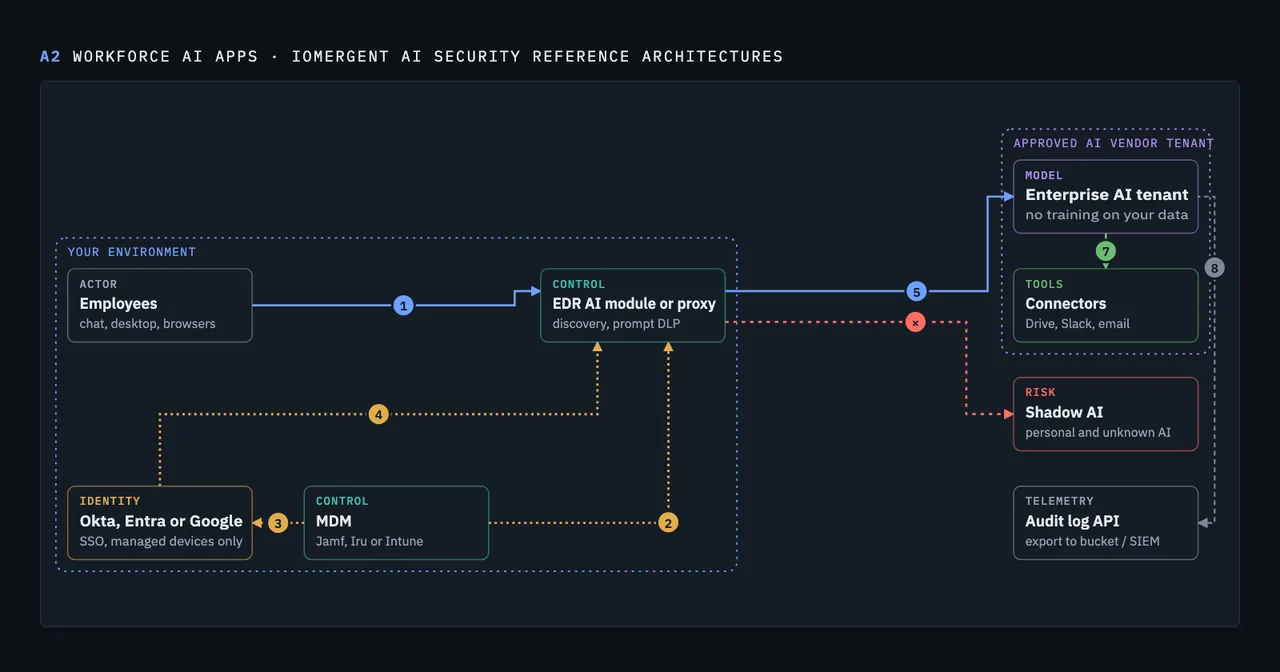
People will use AI whether you approve it or not. Give them an enterprise tenant (ChatGPT Enterprise, Claude for Work, Microsoft Copilot or Gemini for Workspace) with SSO, no training on your data, and defined retention. Then use the MDM and EDR you already run. You probably don’t need an SSE:
- MDM locks Claude Desktop to your company account (Team or Enterprise) and blocks unapproved AI apps, AI browsers and local agents such as OpenClaw.
- Your EDR vendor’s AI module finds AI use and redacts or blocks sensitive data in browser prompts, in the console your MDR already watches.
- A web proxy is the only way to block a personal account on an approved site. If you run Cloudflare or an SSE, it can add the tenant restriction headers OpenAI, Anthropic and Microsoft support on their enterprise tiers.
One gap remains: OpenAI doesn’t document a way to lock the ChatGPT desktop app to your workspace, and its header only works on the web. Our default is to block the desktop app where you handle PHI or other regulated data, and allow it elsewhere. See A2, Workforce AI Apps.
Agent mode is a tenant setting too. ChatGPT agent, Claude in Chrome, Claude Cowork and Copilot Cowork act as the user, in email, files and the browser. Turn them on for a pilot group first and start connectors read-only. Check the defaults: Claude in Chrome and Cowork are on for Claude Team and Enterprise unless you turn them off. See B1, Employee AI Agents.
The AI inside the SaaS you already pay for needs the same review. Vendors switch new AI features on by default, so check the AI settings in every SaaS admin console: who gets them, retention, and which channels or sites are excluded.
Model access
11. Route model traffic through one gateway, with spend caps on every project
Once more than one team builds with AI, or as soon as regulated data flows through API or agent traffic, put an AI gateway in front of the model providers. It holds the real provider keys, gives each team a virtual key, enforces budgets and logs every request with a user attached. A managed gateway like Cloudflare AI Gateway or Prisma AIRS AI Gateway (formerly Portkey) can be live in a day. If you self-host LiteLLM, run pinned, signed container images: its PyPI package was compromised in March 2026. Until then, at minimum, put a spend cap on every project or workspace. If you handle PHI, check that the gateway keeps you inside your vendor’s BAA. Claude Code’s HIPAA configuration, for example, covers only direct connections to the Claude API, not traffic through an LLM gateway. See A3, Gateway and Router.
12. Keep regulated data in-boundary
PHI, payment data, customer PII and source code with strict residency requirements shouldn’t cross the public internet to a third-party API. Use the managed models inside your cloud provider (Amazon Bedrock, Microsoft Foundry or Gemini Enterprise Agent Platform (formerly Vertex AI)) over private networking, with invocation logging turned on. It’s off by default, and on Bedrock it misses the newer mantle endpoint, so log in the app too. Put PHI workloads in their own cloud account. See A4, In-Boundary Inference.
13. Treat open-weight models as untrusted code
A model file can run code when it loads. Pickle-format weights are the classic example. Never let a production system pull a model from a public hub at runtime. Import models on purpose, scan them, prefer the safetensors format, pin versions and sign what you deploy.
AI agents and tools
These steps have no pre-AI equivalent, because agents take actions and can be talked into the wrong ones.
14. Allowlist the tools and MCP servers agents can use
An agent’s power comes from its tools. Keep a short list of approved MCP servers and tools (a toolshed), block everything else, and start each agent read-only. Route tool calls through an MCP gateway once you have more than a handful of agents. Unvetted MCP servers can change behavior after you approve them, so pin versions. See B3, Agents You Build.
15. Decide where a human has to approve
Human approval is the default answer, and it’s the right place to start. Match it to how reversible the action is. Agents can read and draft on their own, and write to internal systems on their own as long as the writes are logged. Anything external, financial, destructive or touching regulated data needs a human to approve each action. Send that approval to the person outside the agent’s own channel. If the agent sees the approval prompt, an injected agent can approve itself. The same goes for AI you ship: when a customer’s AI agent calls your API or MCP server, give it scoped, short-lived OAuth tokens, start with read-only tools, and confirm writes with the user outside the agent. See C1, Customer Agents on Your API.
But approval doesn’t scale, and per-action approval isn’t the only control that works. Inside a sandbox, with good test coverage, clear build rules and a CI gate that enforces them, you can let the clankers rip. The merge gate is where a human still matters: code that ships to production goes through review. For low-risk internal tools, strong tests can stand in. It depends on what you’re building and how much a mistake costs. An agent upgrading dependencies on an internal tool needs far less supervision than one touching payments or customer data. Decide per system, and keep a human on anything you can’t easily undo.
16. Sandbox agent code and allowlist egress
Agents write and run code. Run it in an ephemeral sandbox with no production credentials, destroyed when the task ends. Allow outbound traffic only to the model gateway and the package registries the task needs. Egress control is what turns a successful prompt injection from a data breach into a failed request.
17. Treat everything an agent reads as untrusted input
Prompt injection doesn’t have a complete fix today. EchoLeak, a 2025 flaw in Microsoft 365 Copilot, let a single email make Copilot leak internal data without anyone clicking anything. The practical defense is design. Simon Willison calls the dangerous combination the “lethal trifecta”: access to private data, exposure to untrusted content, and a way to send data out. An agent that reads customer emails, can see your CRM and can send messages has all three. Remove at least one leg for every agent. Scan tool results and retrieved content for injected instructions, but don’t count on scanning alone. If you ship AI to customers, anything a customer uploads is untrusted input too, and retrieval has to filter by tenant before it ranks, so one customer’s documents never reach another’s answer. See C2, AI Features in Your Product.
18. Harden the code supply chain against agents
Coding agents read issues, READMEs and dependencies, and any of them can carry injected instructions. Then they write code that ships. Protect the path:
- Run fork and untrusted pull requests without secrets or write tokens.
- Put a package firewall in front of npm and PyPI to block malicious packages.
- Never let an AI review bot run in a
pull_request_targetjob that checks out the PR’s code. That hands fork code your secrets. - Inventory and control IDE extensions, agent skills and rules files on developer machines. These are a growing supply-chain route. MCP servers and extensions can be blocked; skills and rules files can only be detected.
- Push org-managed settings for coding assistants through MDM: permission mode, allowed commands and allowed MCP servers. Claude Code ignores settings from its admin console once it points at a custom gateway, so MDM is the reliable path.
See B4, Developer AI.
Detection and response
19. Log prompts, tool calls and agent actions where you keep them
When something goes wrong, you’ll need to know who asked what, which tools the agent called with which arguments, and what came back. Log it at the gateway and the MCP gateway, and export vendor audit logs from SaaS AI tools. Send everything to immutable storage with retention first. The SIEM can come later. Logs that sit only in a vendor console tend to vanish when you need them. For vendor AI agents with access to your systems, such as AI SOC tools, record what they do from your side too. ChatGPT’s compliance logs, for example, are kept 30 days, so pull them at least weekly.
20. Write detections for AI abuse
The signals are mostly identity and SaaS signals you can already collect:
- New OAuth grants to AI tools, especially with mail or file scopes
- Tokens used from new IPs or at machine speed
- An agent reading data it has never touched before
- Sudden spikes in model spend on a single key
- Guardrail blocks clustered on one user or app
- Prompt redactions and blocked AI apps from your EDR’s AI module, which your MDR can already see
21. Red team your AI and plan for an AI incident
Test AI apps and agents for prompt injection, data leakage and unsafe actions before release and after major changes. Use the OWASP Top 10 for LLM Applications and the OWASP Top 10 for Agentic Applications as the test checklist, and MITRE ATLAS for how real attackers go after AI systems. Promptfoo, Mindgard and similar tools automate the basics in CI. Then add AI to your incident response plan. Decide who can shut off an agent, how to revoke its tokens in one step, and how to tell whether data left. Run it as a tabletop exercise before you need it.
Where to start: the first 30 days
You don’t need all 21 at once. If you have a month and a small team, do these five. They close the most risk for the least effort:
- Inventory what AI and agent credentials exist (step 1).
- Kill long-lived credentials, starting with classic GitHub tokens and keys on laptops (step 4).
- Buy an enterprise AI tenant, lock Claude Desktop with MDM and turn on your EDR’s AI module (step 10).
- Put a spend cap on every model project or workspace, or stand up a managed gateway (step 11).
- Require human review before any agent merges code or writes to production, and relax it later where your tests earn it (step 15).
After that, finish identity and data, because every agent you add later inherits them. Then the agent controls, which matter most once agents start taking real actions.
Want this list in order for your setup? Build your plan at the top of this page: four questions about the AI you run and your stack, and you get the steps that apply to you with the settings to use.
For diagrams of how these controls fit together, from a single API key up to an enterprise control plane, see the AI security reference architectures. For the questions CTOs ask us about PHI, BAAs and AI vendors, see AI security for CTOs: 50 questions. If you want help working through the list, talk to us.
Want a second opinion on your AI hardening plan?
30 minutes with a CISO. Bring your AI tools and we'll tell you which three steps to take first.
Talk to a CISOAbout IOmergent
IOmergent is the operating CISO for growth-stage companies. Founded in 2021 by Jon Rose and Brett Wilson, we provide fractional CISO (vCISO) services and Managed Cloud Security to SaaS, fintech and healthtech companies. Our team includes 25+ CISOs, and every CISO on our team has led security programs in-house. We have delivered 100+ engagements for 45+ companies. Fractional CISO engagements typically run $8,000 to $25,000 per month, and most engagements start within 2 weeks. More about us